
Couple of months ago i got selected for an SDE intern role at armoriq, a Mumbai based startup . The assignment was to build a defense layer b/w tool calls and the model. And I was expected to build my own AND use a remote MCP server for the tool part. To be honest, I knew absolute 0 about MCPs and what they did back then. But the 4 day submission timeline meant learning and implementing quick.
This writeup sums up MCPs in general -- why they exist, architectural trade-offs and much more, integrating them in your applications (and building your own!). We'll also walkthrough Cossie for reference(the assignment i made)
Roughly two years ago, if you wanted an LLM to interact with external systems -- say, query a Postgres database, pull updated documentation from an API, or trigger an infrastructure deployment, you wrote a bespoke integration.
You wrote custom JSON schemas for OpenAI’s function-calling API, wrote another parser for Anthropic’s tool use payload, manually bound credentials into local execution sandboxes, and had a system prompt ready along with this.
The problem was blatantly obvious: Every tool provider had to write SDK connectors for every agent framework, and every agent framework had to maintain like a gazillion wrappers.
Enter the Model Context Protocol (MCP).
Before we begin, I'd like to thank our quick sponsor i'll dump the blog hierarchy quick. Feel free to skip to any section you'd like to :)
The article is structured into two core sections:
- # 1. Introduction to MCP: The mental model, why MCP was born, its protocol mechanics, how it evolved, my candid perspective on why MCP is simultaneously indispensable yet a transitional scaffold for frontier models, and how developers run it in real daily workflows (like drafting and publishing posts via Codex and Hashnode MCP).
- # 2. Building and Integrating MCPs: The practical engineering guide. We will consume an existing remote MCP server (Context7 for live library documentation), build an in-house infrastructure MCP server from scratch in TypeScript, and dissect how we wired both into Cossie -- an open-source guarded agent runtime with dynamic discovery, a zero-trust policy engine, and human-in-the-loop approval gates.
1. Introduction to MCP
What exactly is an MCP?
establishing the boundaries immediately: MCP != LLM, it is not an agent framework (like LangChain or AutoGen), and it does not make your model "smarter."
MCP is an open, client-server protocol that just standardises host applications, expose data sources (Resources), actionable operations (Tools), and prompt templates (Prompts) to AI models.
To understand MCP, we need to understand its three core participants:

- Host: runtime environment the user or system interacts with (for ex: our agent runtime Cossie, Claude Desktop, or an IDE). Host owns the user interface, coordinates model inference, manages conversational context, and hosts one or more MCP clients.
- Client: Basically an internal component inside the host that maintains 1 to 1 connections with individual MCP servers. It speaks JSON-RPC 2.0, discovers available tools, and issues execution calls.
- Server: A lightweight, decoupled process (running locally via
stdioor remotely overSSE/HTTP) that exposes capabilities. The server does not know which LLM is querying it (nor does it care) . It simply publishes schemas and executes handlers.
The Protocol Primitives
The specification formally splits server capabilities into three primitives:
| Primitive | Direction | Purpose | Analogy |
|---|---|---|---|
| Tools | Model → Server | Executable functions with side effects or dynamic outputs (e.g., restart_server, query_sql, fetch_docs). Require explicit parameter schemas. |
POST / PUT RPC endpoints |
| Resources | Server → Client | Passive contextual data or files (e.g., application logs, file contents, database schemas) that clients can attach directly to context. | GET endpoints / Static files |
| Prompts | Server → Host | Reusable prompt templates, slash commands, or workflows defined server-side to guide interactions. | Pre-configured macro templates |
In our writeup, we focus primarily on Tools, because in production agent runtimes tools are where real work and failure happens
How MCPs evolved over time
Consider this: before late 2024, if a team built an internal Postgres viewer tool, they faced the classic fragmentation dilemma:
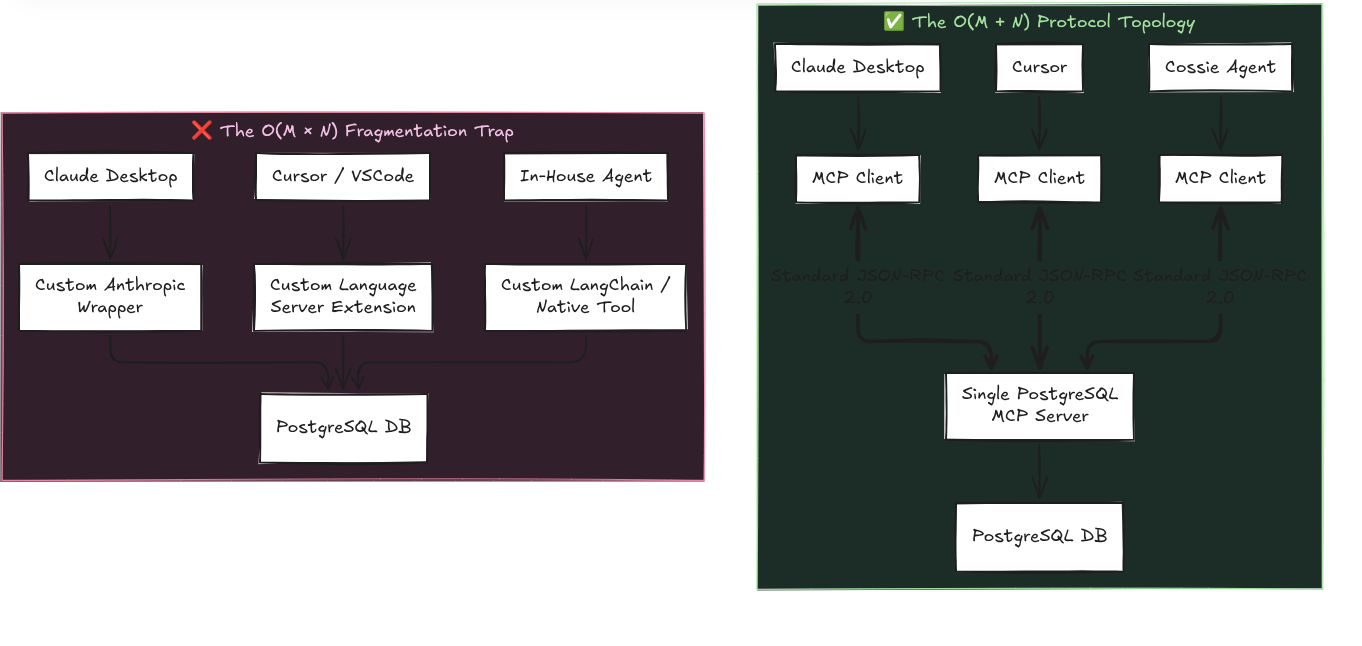
If you had 4 client applications and 10 internal tools, you wrote and maintained 40 separate integration bridges.
If OpenAI changed or modified their SDKs, you have 10 tools breaking simultaneously.
They managed to solve this rudimentarily through MCPs:
- Server authors write once: Expose tools using standard JSON Schema definitions over the MCP SDK.
- Client runtimes consume universally: Any host that implements an MCP client can dynamically introspect tools at startup via
tools/listand invoke them viatools/call.
This is identical to how the Language Server Protocol (LSP) rescued developer tooling in 2016: instead of writing a TypeScript parser for Sublime, Atom, Vim, and VSCode, Microsoft built tsserver over LSP once, and everyone used that instead.
MCP was announced by Anthropic in November 2024 as an opensource standard for LLMs. But this is tech, and things evolve rapidly. Lots of changes since then
The most pivotal governance milestone occurred in December 2024, when Anthropic announced its intention to donate MCP to the Agentic AI Foundation (AAIF) under the Linux Foundation (Anthropic Announcement). This prevented MCP from having vendor lockin. Today, orgs like Block, Apollo, Replit, and dozens of startups contribute directly to the open protocol specification at modelcontextprotocol.io.
MCP is essentially flex tape?
Let's address the elephant in the room, because too many blogs treat MCP like a never ending paradigm.
my personal view: In many ways, MCP is a necessary transitional scaffold for rapidly advancing frontier LLMs. A significant chunk of tasks we assigned to MCP tools like some eighteen months ago is already becoming obsolete as frontier models expand their capabilities.
Consider how developers used tools a year ago. Let's look at design engg for example:
Design MCPs: And this is a personal belief, but , tools like Paper and Figma MCP were popular about a year ago. Opus 5.5 and the latest frontier models have gotten so good at design that you dont need these anymore.
So, will MCP die when models get 10x smarter? I dont know, and I'm not claiming figma mcp aint useful anymore, the point we're trying to establish here is: the purpose/use case of MCPs keeps evolving.
As of writing this blog (November 2026). I use MCPs for:
- content automation (using hashnode/notion mcps)
- retrieving data from the web and loading it up on your personal agents : checkout Yomu . I use it to crawl through any blog and put context onto my agent. My agent does the heavylifting of explaining the blog.
- automating PRs , github access to agents through github MCPs
- Context7 MCP: and this is something which we used in Cossie. For fast moving libraries with regular updates, we plug in Context7 to fetch verified API signatures before writing any loc
And much more
this video by David Ondrej breaksdown connecting your desktop agents to local servers in this video
MCPs can be In-House custom, or Remote:
When designing an architecture around MCP, you encounter two distinct axes: Ownership (your server vs. third-party server) and Transport (local stdio vs. network sse/http).
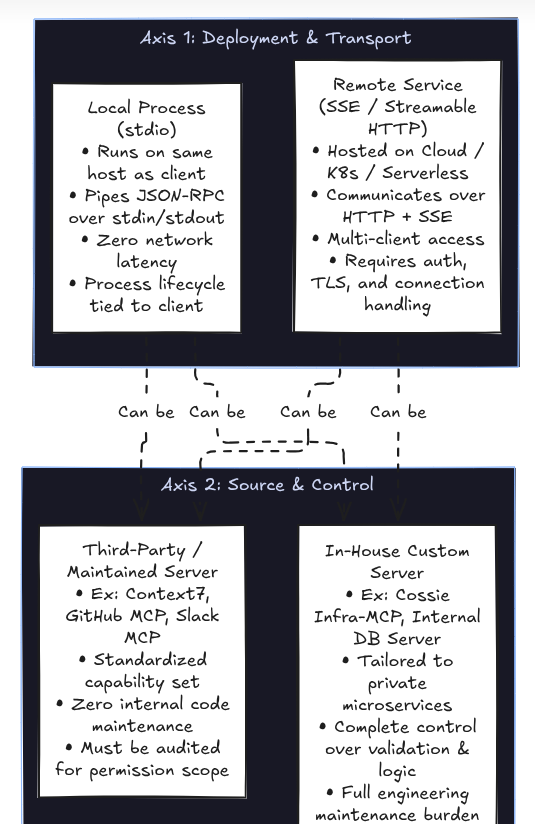
Let's actually try to figure out how we managed to integrate Context7 , and build our own MCP server for the SDE assignment application
2. Building and Integrating MCPs:
A good question to begin with -- Do we actually need a custom MCP server?
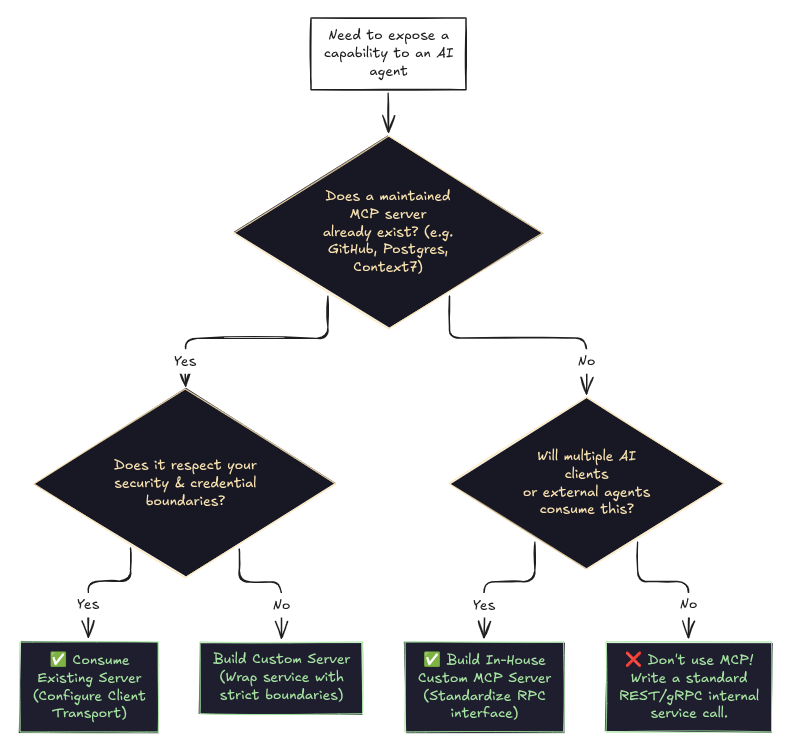
Building an MCP server makes sense when:
- You need to expose private infra operations (e.g., restarting cluster services, deploying releases, running internal database migrations).
- You want multi-client reusability: the same tool should be callable by your custom agent, your engineering team in Cursor, and customer support bots in Claude Desktop.
- You need a strict security boundary: sanitising inputs and hiding raw credentials from the model.
If you are only building a single, proprietary agent that talks to one internal endpoint, slapping an MCP layer on top can be unnecessary abstraction overhead.
But when you need dynamic discovery and decoupling, MCP pays huge dividends.
Integrating a Remote MCP
In Cossie, we needed our agent to answer questions about external libraries without relying on stale model training data. Instead of building a custom web scraper, we integrated Context7 (@upstash/context7-mcp), an MCP server that indexes and serves up-to-date documentation.
Let’s inspect how an MCP server is configured in a production configuration file.
In Cossie, we treat server configurations as declarative, strongly typed infrastructure contracts:
// apps/agent/src/config/mcp-servers.ts
// Single global source of truth for all MCP servers.
// The registry bootstraps itself from this configuration.

import type { MCPServerConfig } from "@cossie/shared-types";

export const MCP_SERVERS: MCPServerConfig[] = [
  {
    id: "infra-mcp",
    name: "Infrastructure MCP",
    transport: "stdio",
    command: "node",
    args: [
      "../custom-mcp/dist/index.js",
    ],
  },
  {
    id: "context7",
    name: "Context7",
    transport: "stdio",
    command: "node",
    args: [
      "./node_modules/@upstash/context7-mcp/dist/index.js",
      "--api-key",
      process.env.CONTEXT7_API_KEY!,
    ],
  },
];
Notice what’s happening here:
id: A unique internal namespace to avoid naming collisions across servers.transport: Tells the client whether to launch a child process (stdio) or dial an HTTP endpoint (sse).command&args: Forstdio, the client spawns the target executable. The Context7 server binary runs locally, but internally queries Upstash’s remote documentation index via the passed API key.
How does the local MCP client actually work though?
Here is the underlying lifecycle:
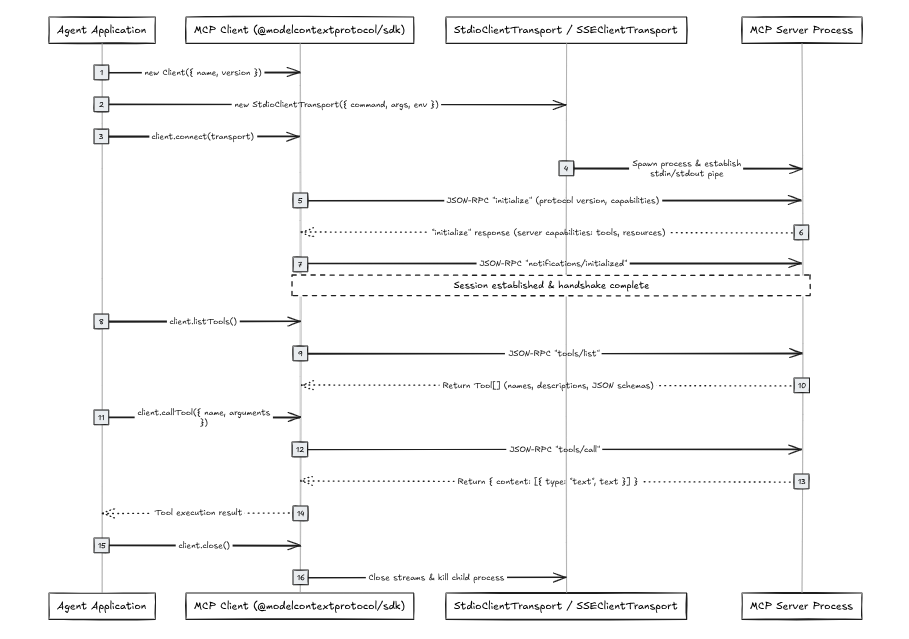
building an adapter for translating MCP to LLM Tool Schemas
btw, LLMs do not speak MCP. MCP servers return lists of tools formatted as JSON schemas, something like:
{
  "name": "restart_server",
  "description": "Restart a server",
  "inputSchema": {
    "type": "object",
    "properties": {
      "serverId": { "type": "string" }
    },
    "required": ["serverId"]
  }
}
Now, say, gemini expects functionDeclarations. OpenAI expects { type: "function", function: { ... } }. Anthropic expects { name, description, input_schema }. What now?
We must bridge this gap with an adapter. I built a production styled adapter in Cossie
// apps/agent/src/services/agent-services/tool-adapter.service.ts
// Gemini doesn't understand raw MCP tools.
// The MCP registry returns { name, description, inputSchema }.
// Gemini expects { functionDeclarations: [...] }.
// This service converts MCP Tool -> Gemini Tool.

import type { DiscoveredTool } from "@cossie/shared-types";

export class ToolAdapterService {
  toGeminiTools(tools: DiscoveredTool[]) {
    if (!tools || tools.length === 0) {
      return undefined;
    }
    return [
      {
        functionDeclarations: tools.map(tool => ({
          name: tool.name,
          description: tool.description,
          parameters: JSON.parse(JSON.stringify(tool.inputSchema)),
        })),
      },
    ];
  }
}

export const toolAdapterService = new ToolAdapterService();
Building a custom MCP server:
We’ll build the server using @modelcontextprotocol/sdk in TypeScript that exposes a concrete, realistic tool: query_database_stats.
Step 1: Project Setup & Dependencies
mkdir my-custom-mcp && cd my-custom-mcp
npm init -y
npm install @modelcontextprotocol/sdk zod
npm install -D typescript @types/node tsx
npx tsc --init
Step 2: The Server Implementation
Here is the entire implementation in a single, runnable file. Notice the clear breakdown of server initialization, schema advertisement, and RPC execution:
// src/server.ts
import { Server } from "@modelcontextprotocol/sdk/server/index.js";
import { StdioServerTransport } from "@modelcontextprotocol/sdk/server/stdio.js";
import {
  CallToolRequestSchema,
  ListToolsRequestSchema,
} from "@modelcontextprotocol/sdk/types.js";

// 1. Initialize the MCP Server instance
// We declare its metadata and advertise what protocol capabilities it supports (tools)
const server = new Server(
  {
    name: "database-ops-mcp",
    version: "1.0.0",
  },
  {
    capabilities: {
      tools: {}, // Tells the client: "This server exposes callable tools"
    },
  }
);

// 2. Register the tool discovery handler ("tools/list")
// When any AI client connects, it fires this RPC method to discover available functions and their schemas
server.setRequestHandler(ListToolsRequestSchema, async () => {
  return {
    tools: [
      {
        name: "query_database_stats",
        description: "Fetch real-time connection pool and storage stats for a target database cluster.",
        // Standard JSON Schema defining the exact parameters the model must pass
        inputSchema: {
          type: "object",
          properties: {
            clusterId: {
              type: "string",
              description: "Unique cluster identifier (e.g., 'pg-prod-us-east-1')",
            },
            includeTableSizes: {
              type: "boolean",
              description: "Whether to include individual table disk usage statistics.",
            },
          },
          required: ["clusterId"],
        },
      },
    ],
  };
});

// 3. Register the execution handler ("tools/call")
// When the LLM decides to invoke a tool, the client dispatches this request with arguments
server.setRequestHandler(CallToolRequestSchema, async (request) => {
  const { name, arguments: args } = request.params;

  if (name !== "query_database_stats") {
    throw new Error(`Unknown tool requested: ${name}`);
  }

  // Extract typed parameters safely
  const clusterId = String(args?.clusterId);
  const includeTableSizes = Boolean(args?.includeTableSizes);

  // Business logic execution (e.g., querying Postgres or internal metrics)
  const result = {
    clusterId,
    activeConnections: 42,
    idleConnections: 8,
    maxConnections: 100,
    storageUsedBytes: 4859032049,
    tables: includeTableSizes
      ? [
          { name: "audit_logs", sizeBytes: 2849032049 },
          { name: "users", sizeBytes: 1204940 },
        ]
      : undefined,
  };

  // The protocol contract requires results wrapped in a structured content array
  return {
    content: [
      {
        type: "text",
        text: JSON.stringify(result, null, 2),
      },
    ],
  };
});

// 4. Bind the server to a transport (stdio)
async function main() {
  const transport = new StdioServerTransport();
  await server.connect(transport);

  // CRITICAL: Never use console.log here! It writes to stdout and corrupts JSON-RPC framing!
  console.error("Database Ops MCP Server running on stdio");
}

main().catch((err) => {
  console.error("Fatal server error:", err);
  process.exit(1);
});
NOTE: and this is something which i encountered --
console.logvsstdio: In anstdioserver,stdoutis exclusively reserved for JSON-RPC 2.0 messages. If you or any third party library callsconsole.log("Connecting..."), that raw string is piped to the client's JSON parser, triggering an immediate protocol framing crash:SyntaxError: Unexpected token 'C', "Connecting..." is not valid JSON. ALWAYS log tostderrviaconsole.error().
How does our app actually connect and call this?
And that’s genuinely the entire MCP server side! At its core, an MCP server is just an isolated program waiting for standard JSON-RPC messages over a transport like stdio or sse.
In a production project, you usually don't dump all tools into one giant server.ts file.
you split tools, schemas, and handlers into modular directories.
If you want to see how this scales, check out Cossie's custom infrastructure MCP server implementation, where individual tool files (like restart_server and deploy_release) are dynamically registered into the server instance.
Now, how does your host application actually wire this up and trigger tool calls? You don't import this server file like a normal library -- it runs as a separate process:
- Global Initialization (Boot phase): During your backend's startup sequence, your application initializes an MCP client pointing to your server script (via
StdioClientTransport({ command: "node", args: ["./dist/server.js"] })). This connects once and callsclient.listTools(). This fetches all exposed schemas and registers them globally into your app's memory/tool catalog, so you don't pay child-process spawn overhead on every chat prompt. - Adapting for your LLM: When preparing a prompt, your backend passes these registered tool definitions through an adapter (like the Gemini adapter we saw earlier) so the model recognizes them as callable functions.
- Triggering the Tool Call: When the user chats and the LLM responds with a tool call intent (e.g.
{ name: "query_database_stats", args: { clusterId: "pg-prod-us-east-1" } }), your agent orchestrator catches that function call and invokesclient.callTool(...). The client sends atools/callJSON-RPC message over the stdin pipe, your server's handler runs, and the returned text content is fed back into the model's message history to generate the final response.
More about Cossie's in-house MCP server:
In Cossie, our custom server exposes high-impact infrastructure controls. I chose these as the assignment was centered around a devops safety guardrail:
list_servers: Enumerate running instancesrestart_server: Reboot a target compute nodeget_server_logs: Stream container logsdeploy_release: Trigger a blue/green deploymentrollback_release: Instantly revert to a previous release tag
the chatbot's LLM was responsible for making the above tool calls. But just because an MCP server exposes restart_server doesnt mean an LLM should be permitted to execute it. This is exactly what we built with cossie, a guardrail which prevents such tool calls. A middle layer if you will. To checkout the architecture and how I implemented it , checkout the documentation for Cossie
If you’re building agents today, don't just ask how many tools you can connect to your model. Ask what happens when your model decides to call them.
This was a brief about MCPs and building your own and my point was to get Cossie across as a bonus. The problem statement of "containing" an AI application is genuinely interesting and evolving. Feel free to shoot dms on twitter ( or any socials really! ) and lmk your thoughts
- Cossie repo: github.com/dexisback/cossie
- Official Model Context Protocol Specification: modelcontextprotocol.io
- TypeScript MCP SDK: github.com/modelcontextprotocol/typescript-sdk
- Upstash Context7 MCP: github.com/upstash/context7-mcp
- Twitter / X: x.com/dextertwts
- GitHub: github.com/dexisback
- LinkedIn: linkedin.com/in/amaanworks86
Comments
Join the discussionNo comments yet. Be the first to comment.